
Released 10/14/26
When a patient describes what they need to Gemini in Google AI Mode (such as “dentist near me who can see my son Saturday morning, takes Delta Dental”) Google returns live, bookable scheduling slots inline. The patient selects the booking slot that works best for them and is taken to your online booking page with the selected service and time slot pre-selected. A couple of clicks later, the appointment is saved to your Dentrix Ascend calendar.
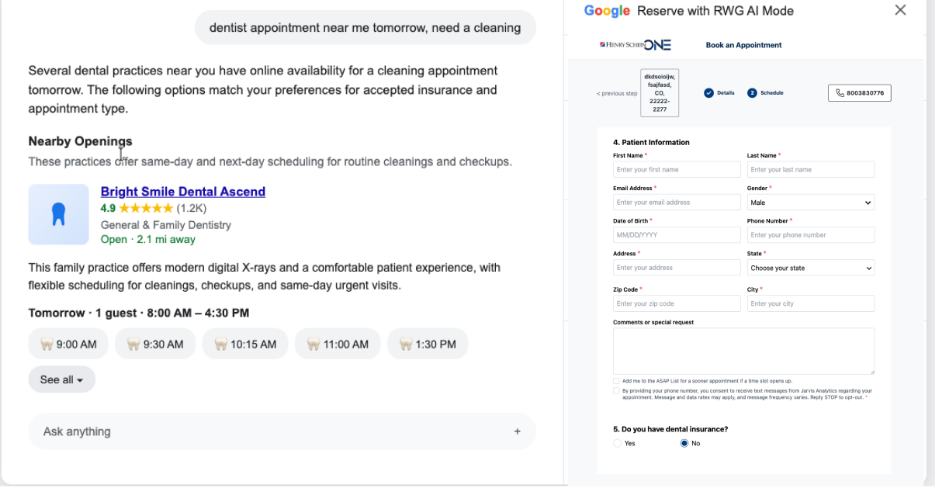
Notes:
- This is not a new booking product. It’s an upgrade to our existing Reserve with Google feature that enables patients to find and book appointments with using Google AI.
- Dentrix Ascend remains the source of truth for appointment types and durations, provider schedules, new-patient eligibility, operatory and block scheduling constraints, lead-time and booking-window rules, and cancellation policy. No booking rule is duplicated on Google’s side.
What changes for your practice:
- If your practice is already live on Reserve with Google via Dentrix Ascend – No additional action is needed.
- If your practice is using online booking but is not on Reserve with Google – Enable Reserve with Google in Dentrix Ascend, and verify Google Business Profile is claimed and verified.
- If your Google Business Profile is unverified or duplicated – This must be resolved first. Results for your practice will not appear without a verified GBP.