
EARLY ACCESS ONLY
When you create an alias procedure code, Dentrix Ascend now provides options for how fees should be populated in the other fee schedules across all locations: with the fee from the original procedure code or with a different amount (such as the fee specified for the new alias procedure code or $0.00).
Note: In a previous release, the new alias procedure code in other fee schedules automatically inherited the original procedure code’s fee.
To populate fees for a new alias procedure code in other fee schedules
1. After you have set up all the options for creating a new alias procedure code, click Create.
The Initial Fees for New Alias Procedure Code dialog box appears.
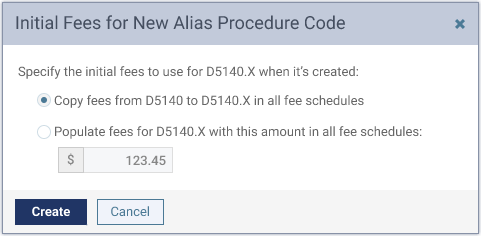
2. Select one of the following options:
- Copy fees from [original procedure code] to [new alias code] in all fee schedules – In each of the other fee schedules across all locations, the fee for the newly created alias procedure code will be populated with the fee for the original procedure code (the procedure code that the alias procedure code is based on) from the current location’s fee schedule.
Note: This option is selected by default.
- Populate fees for [new alias code] with this amount in all fee schedules – In each of the other fee schedules across all locations, the fee for the newly created alias procedure code will be populated with a specified amount. With this option selected, enter an amount in the box provided.
Note: By default, the amount entered is the specified fee (from the Location fee box) for the new alias procedure code.
Note: The existing functionality of applying the “No Write-off” flag (if set) and the “Paid in Full” flag (if set) to the alias procedure code in every fee schedule occurs regardless of the option selected in the Initial Fees for New Alias Procedure Code dialog box.
3. Click Create.