
EARLY ACCESS ONLY
When you are viewing the list of patient forms for your organization, you can now filter by name and status. These filtering capabilities can help you find a form if there are a lot of forms in the list.
To filter the list of patient forms
1. Go to Settings > Form Builder.
The Patient Forms page opens.
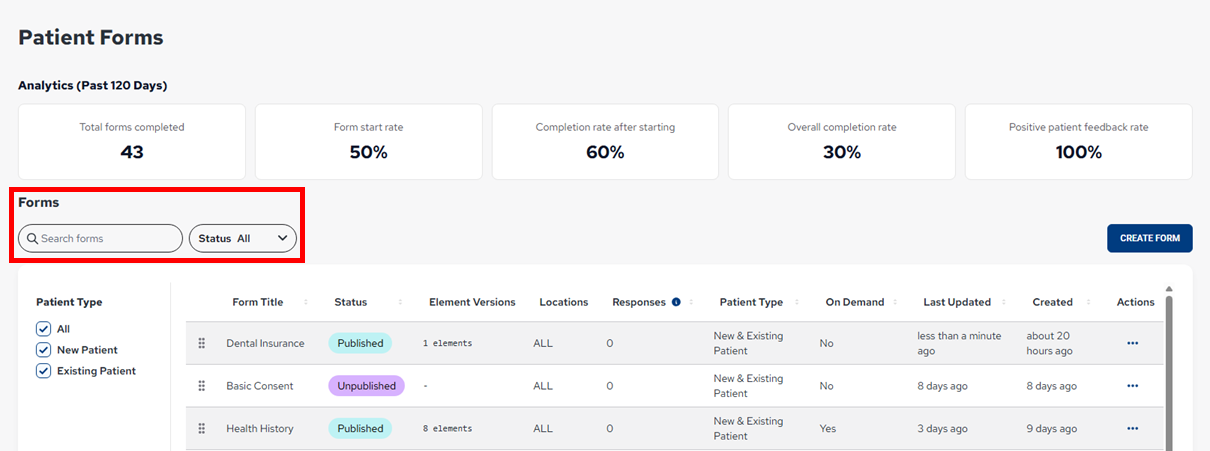
2. Use any of the following filters as needed:
- Search – Start typing a form name in the box to the view forms with a name that matches any part of the search text. The search is not case sensitive.
- Status – Select All to view forms with any status, or select certain statuses to view forms that have been assigned one of the selected statuses.
Notes:
- The applied filtering is preserved until you close the browser tab that is displaying the Patient Forms page.
- The metrics at the top of the page are not affected by the applied filters.Bottom of Form