
EARLY ACCESS ONLY
Previously, Dentrix Ascend lacked visibility into how effectively patient forms were performing. You could not easily track key metrics, such as form completion rates, time taken by patients, common drop-off points, or overall patient engagement with the forms. This lack of data hindered your ability to optimize your patient intake process and understand the value derived from using digital forms.
Now, Dentrix Ascend provides easy-to-understand analytics that focus on key performance indicators (KPIs) for your patient forms. These KPIs may help you gain actionable insights and empower you to optimize your forms and intake workflows, improve the patient experience, and reduce administrative friction. The KPIs may help you see, at a glance, how many forms patients are submitting, where patients drop off, and how patients feel about the experience.
Note: Detailed breakdowns (by location, form, patient type, and so on) may come in a later release.
To view the patient forms metrics
Go to Settings > Form Builder.
The Patient Forms Dashboard page opens on a new browser tab. The new KPIs appear at the top of the page. The KPIs displayed are organization-wide metrics for the past 120 days.
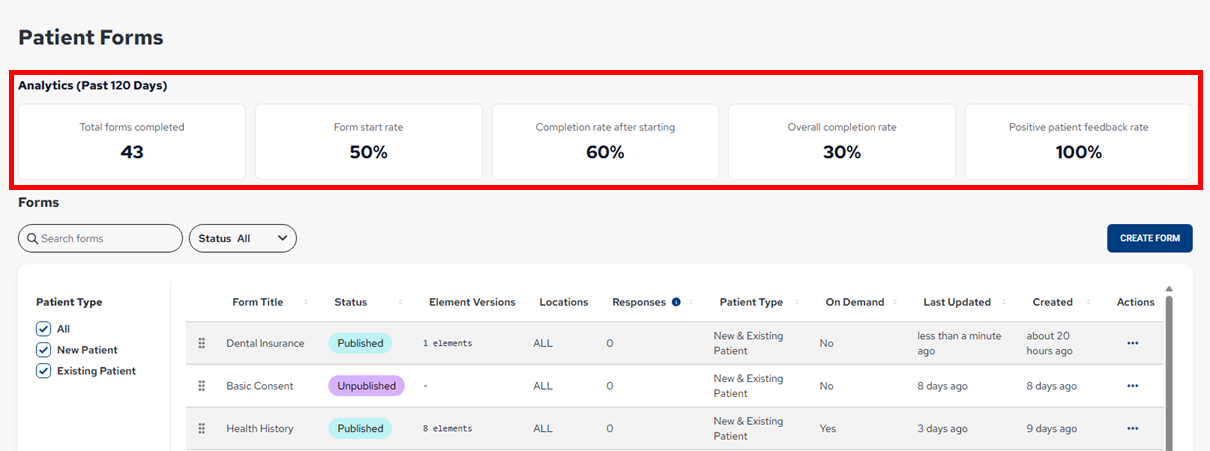
Metrics:
- Total Forms Completed – The number of forms completed by patients within the past 120 days.
- Form Start Rate -The percentage of unique forms sent within the past 120 days that have been started.
- Completion Rate After Starting – The percentage of forms started within the past 120 days that have been submitted.
- Overall Submission Rate – The percentage of unique forms sent within the past 120 days that have been submitted.
- Positive Patient Feedback Rate – The percentage of feedback submitted within the past 120 days that has been good (top rated).