
Released 8/5/26
Previously, when you were reviewing campaign results, you had limited insight into communication outcomes. When a message was not successfully delivered, you were unable to quickly determine whether the issue was caused by invalid contact information, an unsubscribed patient, a carrier rejection, mailbox issue, or another delivery-related failure. Without more detailed delivery feedback, you were often left with insufficient information to take meaningful action when communications failed.
Now, the delivery statuses for email and text messages are more specific and granular, giving you greater insight into the outcome of individual communications and helping you more effectively troubleshoot unsuccessful delivery attempts.
The enhanced delivery statuses provide additional transparency into communication outcomes so you can do the following:
- Better understand campaign performance.
- Better understand what happened to each communication after it was sent.
- Identify and correct inaccurate patient contact information.
- Troubleshoot delivery failures on your own.
- Improve future campaign reach and effectiveness.
- Gain confidence that communications are successfully reaching intended recipients.
Note: No workflow changes or additional configuration are required.
To view the delivery statuses
1. On the Settings menu, under Patient Care, click (or tap) Patient Communications.
The Patient Communications page opens.
Note: As in previous versions, accessing this page requires the “Review Communications setup” security right (in the “Settings” category).
2. Select the Campaigns tab.
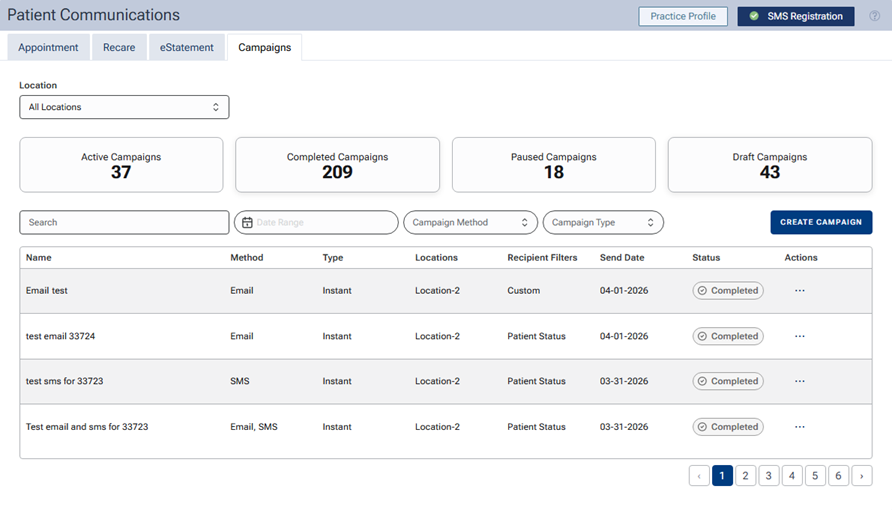
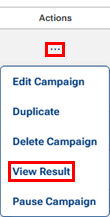
3. For a completed campaign, expand the Actions menu, and then select View Result.
A dialog box opens and displays the campaign’s recipient results. Delivery statuses appear in the Status column.
4. Identify communication outcomes, and take corrective action as needed.
New SMS statuses:
- Messages still processing (Sending)
- Successfully delivered messages (Delivered)
- Messages that could not be delivered (Not Delivered)
- Patients who have opted out (Opted Out)
- Delivery failures (Failed)
New email statuses:
- Delivery processing (Sending)
- Successful delivery (Delivered)
- Temporary delivery issues (Deferred)
- Delivery rejection (Bounced)
- Patient unsubscribes (Opted Out)
- Permanent failures (Failed)
- Open activity (Opened)
- Link engagement (Clicked)