
Released 9/2/26
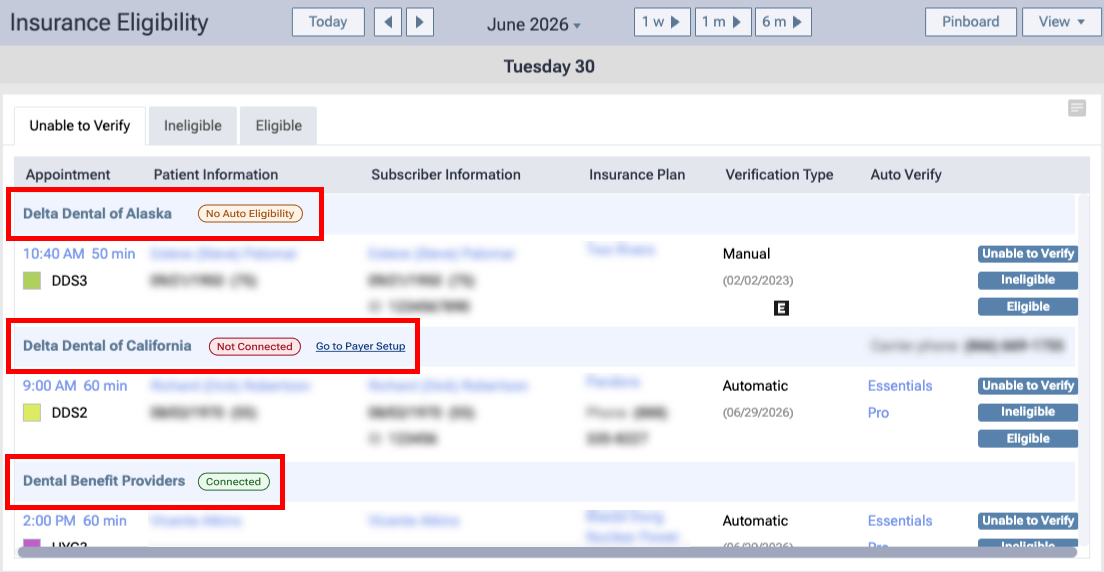
Payer connection statuses now appear directly on the Insurance Eligibility page (go to Schedule > Insurance Eligibility). Next to each payer’s name, one of the following status indicators appears:
- No Auto Eligibility – This payer does not support automated eligibility verifications, so a connection cannot be added for this payer.
- Not Connected – A connection does not exist for this payer. A Go to Payer Setup link appears, which you can click to open the Payer Connection Portal on a new browser tab and then add the payer connection.
- Connected – A connection exists for this payer.
Note: This functionality is available only with an Eligibility Pro subscription.