
Released 7/13/26
If your office has a subscription for Eligibility Essentials or Eligibility Pro On Demand, Eligibility Essentials success metrics appear at the top of the Insurance Eligibility page (go to Schedule > Insurance Eligibility).
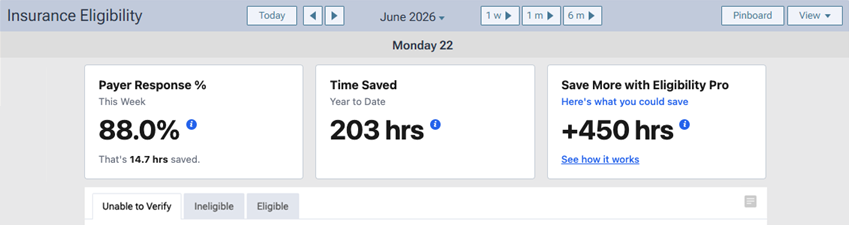
The Payer Response % box displays the percentage of requests (Pro and Essentials) that returned a valid response in the past week (today and the previous six days). The box also displays the estimated number of hours that have been saved in the past seven days by using electronic eligibility verifications (20 minutes for each successful Pro reply; 5 minutes for each successful Essentials reply). These metrics help you know how well Eligibility Pro is working and how much staff time is being saved
Note: Click the “i” icon to see the number of valid Eligibility Pro and Essentials responses and the total number of Eligibility Pro and Essentials requests.
The Time Saved box displays the estimated number of hours that have been saved this calendar year (year-to-date; from January 1 of this year to today) by using electronic eligibility verifications (20 minutes for each successful Pro reply; 5 minutes for each successful Essentials reply). This metric helps you estimate how much staff time is being saved.
Note: Click the “i” icon to see the number of hours saved from Eligibility Pro requests and the number of hours saved from Eligibility Essentials requests.
The Save More with Eligibility Pro box displays the number of staff hours that could have been saved this calendar year (year-to-date; from January 1 of this year to today) by using Eligibility Pro versus Eligibility Essentials (based on 20 minutes for each successful Pro reply versus 5 minutes for each successful Essentials reply).
Note: To see a demonstration of Eligibility Pro, click the See how it works link to open the corresponding webpage on a new browser tab.