EARLY ACCESS ONLY
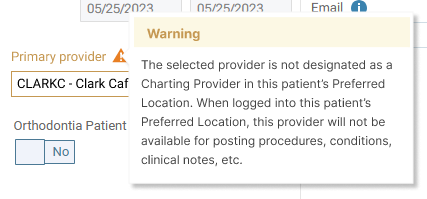
Dentrix Ascend now displays a warning message if the primary provider that you select for a patient is not designated as a charting provider in the patient’s preferred location. This warning lets you know that when you are logged in to the patient’s preferred location, the patient’s primary provider will not be available for selection when you enter conditions, treatment, clinical notes, and so forth.
Note: A provider can be designated as a charting provider in that provider’s user account settings.
If a patient’s preferred location is X, but the provider that you want to assign to the patient as a primary provider is a charting provider only in locations Y and Z, when you select that provider as the patient’s Primary provider, the warning message appears.