Released 3/25/26
While you are working with ERAs, you can now easily identify if a payment is not for the total amount due. This can happen if (1) there is a provider-level adjustment or (2) depending on your specified ERA delivery method, the payment is split between locations that share a tax ID. For example, if the total check is for $40, but it is split into two $20 payments for different locations, the split amount is $20 for each payment. This enhancement allows for easier tracking of claim payments and adjustments.
To view split payment amounts
Go to Home > Bulk/ERA Insurance Payments, and then select the ERA Payments tab.
On the left panel, for each ERA, in addition to the Total amount, there is now a Split Approved amount. If those two amounts differ, the total appears in red text to alert you of the discrepancy.
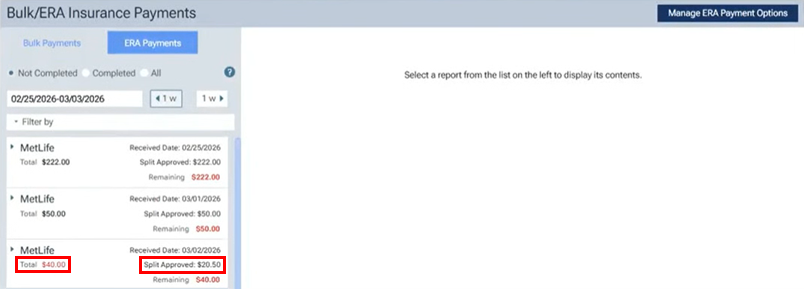
On the left, select an ERA with a red total. The ERA details appear on the right.
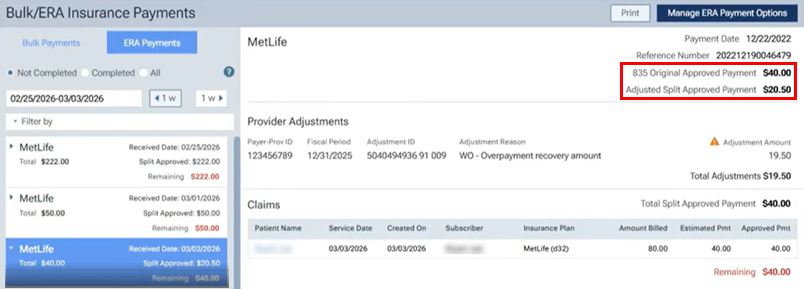
In the upper-right corner, the ERA total and split amounts appear:
- The 835 Original Approved Payment is the amount of the check or transfer from the insurance that is to be posted.
- The Adjusted Split Approved Payment is the amount of this portion of the payment because either an adjustment was taken out of the total amount or the payment was split between different locations.
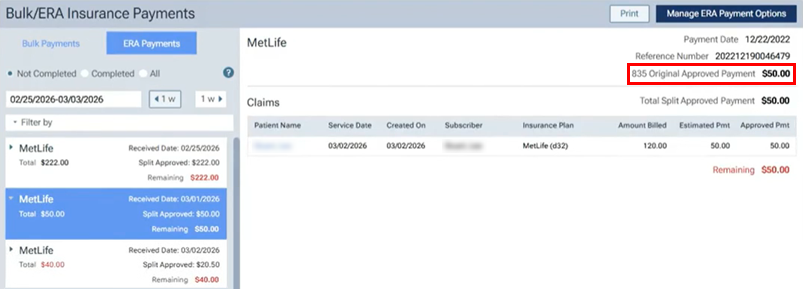
Note: For an ERA that has not been split or adjusted, the Total and Split Approved amounts on the left match, and on the right, the 835 Original Approved Payment amount appears but the Adjusted Split Approved Payment amount does not.