
EARLY ACCESS ONLY
The Provider Production & Collections Report is intended to replace the workflow in Power Reporting for calculating provider compensation. This new report presents procedure-level production and collection totals grouped by provider, combining financial integrity from the Provider A/R Totals Report with procedure and patient details. The Provider Production & Collections Report provides a reliable way to analyze provider production and collections for a selected period and use those results for provider compensation and operational review. Provider inclusion on the report is based on actual reportable activity for a specified period and location. The report is optimized for understanding provider activity and supporting compensation workflows.
If you are responsible for provider compensation and financial performance, you can use the report to review provider production and collections for a selected period and location, with supporting patient and procedure details, so you can validate activity, calculate compensation, and investigate variances without relying on a balance-oriented A/R report.
Note: The existing Provider A/R reports are balance-oriented: they are designed to explain beginning and ending receivable balances and may include providers who did not perform work during the period but still have an outstanding balance. They do not provide the intended production-and-collection view at the provider and procedure level.
Key capabilities:
- Provider-level summary of procedure charges, charge adjustments, credit adjustments, production total, patient payments, insurance payments, collection adjustments, and collection total.
- Expandable detail showing the patient, procedure, date of service, treatment area, UCR procedure charge, production, collection, and relevant adjustments.
- Filtering by date range, location, provider, and other supported report criteria, with safeguards consistent with native reporting performance constraints.
- Inclusion of qualifying procedure activity even when the resulting production amount is $0.
- Consistent sign conventions: collections display as positive when money is received, while refunds or reversals display as negative.
- On-screen summary plus full export for detailed analysis and reconciliation.
Report purpose and boundaries:
- The report provides production and collection activity that is attributed to each provider during a selected period.
- The report does not calculate beginning balance, ending balance, net A/R change, or percent collected.
- The report is not expected to return the same provider list as the Provider A/R Totals Report because the inclusion criteria are intentionally different.
Provider inclusion logic comparison:
This table compares the inclusion criteria for providers on the Provider Production & Collections Report and the Provider A/R Totals Report:
Scenario | Provider Production & Collections | Provider A/R Totals |
|
|
|
|
|
|
|
|
|
|
|
|
|
|
|
Security rights: Access to this report is controlled by the following existing security rights:
- Financial Reports – Allows the user to generate and manage (if “Manage Reports” is granted) the report in his/her assigned location.
- Financial Reports for All Providers – Allows the user to view provider-specific financial data for any provider (across all locations).
To generate the report
1. On the Home menu, select Provider Production & Collections.
The Provider Production & Collections page opens.
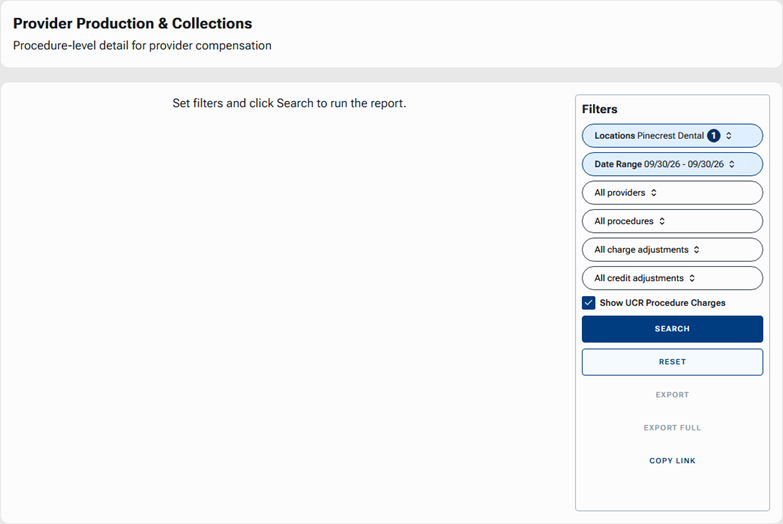
2. Adjust any of the following filters as needed:
- Locations – Include a specific location or multiple locations. Only the authorized practice locations are available.
- Date Range – Specify the reporting period. The report is based on the modified (applied) date. Each transaction that has been applied to a procedure during the specified period for the report is included; even if the procedure’s original date of service was in an earlier month, it is included.
- Providers – Include all providers or specific providers.
- Procedures – Include all procedures, specific procedure codes, or procedures in specific procedure categories.
- Charge Adjustments – Include all charge adjustment types or specific charge adjustment types.
- Credit Adjustments – Include all credit adjustment types or specific credit adjustment types.
- Show UCR Procedure Charges – Display or hide the UCR (Usual, Customary, and Reasonable) fee column.
Notes:
- Applied filters are automatically reflected in the browser URL. You can bookmark or copy/paste this URL to share identical filter views with authorized colleagues. To copy the URL so you can paste it into a message for a coworker, click COPY LINK.
- When you open the report from the Home menu (without URL parameters), Dentrix Ascend automatically loads your last-used filter criteria.
- If any filters have been modified, you can click RESET to return to the filters to their default values.
3. Click SEARCH.
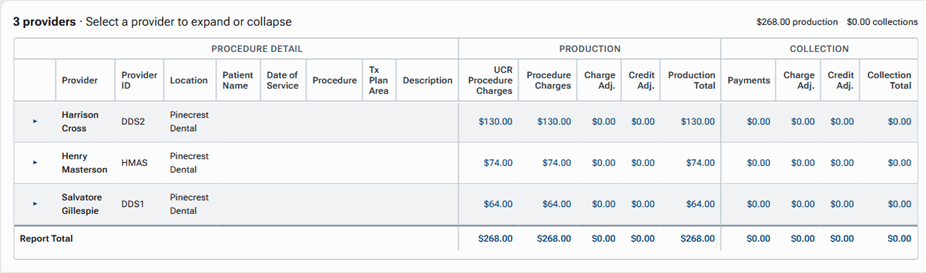
The report is generated according to the specified filters. On the report, the PROCEDURE DETAIL appears on the left, and the PRODUCTION and COLLECTION details appear on the right.
Notes:
- For the selected date range and location, the report includes providers with qualifying production or collection activity.
- A provider with no period activity is not included.
- A provider with qualifying $0 procedure activity is included even when the net production amount is $0.
- Production is presented separately from collections so you can use either measure in provider compensation workflows.
4. Each provider included on the report is a section that you can expand or collapse. As needed, expand or collapse a provider’s section to view or hide the individual procedures (and the corresponding individual production and collection breakdowns) that are associated with that provider.

Note: Procedures for a provider are sorted by date of service and then patient name.
5. Do any of the following:
- To export the report without procedure details, click EXPORT.
- To export the report with procedure details, click EXPORT FULL.
Note: On the exported report, the provider and provider ID repeat on every procedure row for spreadsheet analysis.
The report provides the following information:
- PROCEDURE DETAIL:
- Provider – The provider’s full name.
- Provider ID – The provider’s ID.
- Location – The location of the transactions associated with the provider.
- Patient Name – The full name of the patient associated with the procedure.
- Date of Service – The date the procedure was performed.
- Procedure – The procedure’s code.
- Tx Plan Area – The treatment area, tooth (if applicable), and surface (if applicable) associated with the procedure.
- Description – The procedure’s description.
- Provider – The provider’s full name.
- PRODUCTION:
- UCR Procedure Charges – The charge from the location’s fee schedule (the UCR fee schedule).
- Procedure Charges – The standard charge for the procedure, which increases production.
- Charge Adj. – The sum of applied charge adjustments that affect production.
- Credit Adj. – The sum of applied credit adjustments that affect production.
- Production Total – The sum of all procedure charges, applied production charge adjustments, and applied production credit adjustments.
- UCR Procedure Charges – The charge from the location’s fee schedule (the UCR fee schedule).
- COLLECTION:
- Payments – The sum of all applied payments and refunds/reversals.
- Charge Adj. – The sum of applied charge adjustments that affect collections.
- Credit Adj. – The sum of applied credit adjustments that affect collections.
- Collection Total – The sum of all applied payments, applied collection charge adjustments, and applied collection credit adjustments.
- Payments – The sum of all applied payments and refunds/reversals.
- Report Total – Each production and collection column has a total for all providers on the report.
Notes:
- All production and collection dollar amounts, adjustments, and calculation logic originate from the Provider A/R Totals Report.
- To keep this report focused on compensation and procedure-level transactions, the following balance-tracking fields (which are included on the Provider A/R Totals Report) are excluded: Beginning Balance, Ending Balance, Net Change, and % Collected.