
Released 5/27/26
There is a new security right, “Update patient procedure amount,” that determines if a user can update a procedure’s amount by clicking the Update to: [amount] link. If a user has not been granted the “Edit patient procedure amount” security right, the user can be granted the “Update patient procedure amount” right so he/she can update the amount using one of the following methods:
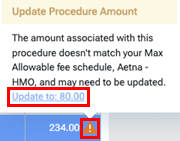
#1 – In a patient’s ledger, if an orange warning icon appears next the Amount, click the icon to view a tooltip that indicates the name of the max allowable fee schedule that the procedure amount does not match, and then click the Update to: [amount] link to update the procedure’s Amount to match what is in that max allowable fee schedule.

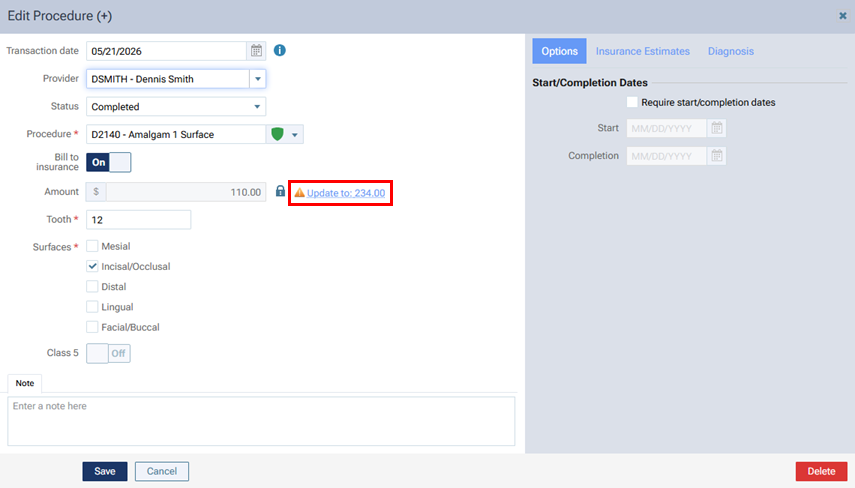
#2 – In a patient’s ledger, if you click a procedure to edit it, and an orange warning icon appears next the Amount to indicate that the Amount does not match the charge for this procedure in the applicable fee schedule, click the Update to: [amount] link to insert the indicated amount into the Amount box.
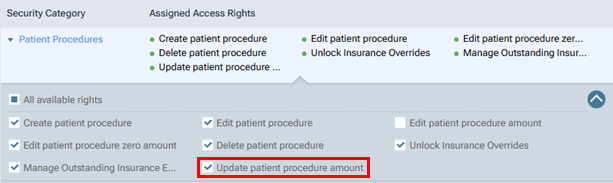
The new “Update patient procedure amount” right is in the “Patient Procedures” category.
Notes:
- If a user role has already been granted the “Edit patient procedure” right:
- If that role has not already been granted the “Edit patient procedure amount” right, the role is granted the new “Update patient procedure amount” right automatically.
- If that role has already been granted the “Edit patient procedure amount” right, the new “Update patient procedure amount” right is also granted automatically because it is required if the “Edit patient procedure amount” right is granted.
- If that role has not already been granted the “Edit patient procedure amount” right, the role is granted the new “Update patient procedure amount” right automatically.
- For new Dentrix Ascend organizations, all default user roles (Administrator, Receptionist, Provider, and Billing Coordinator) are granted the “Edit patient procedure amount” right by default, so the new “Update patient procedure amount” right is granted because it is required if the “Edit patient procedure amount” right is granted.