
Released 12/17/25
Important Note: Some of the new features and enhancements may require an updated acquisition agent. For instructions on checking for updates, refer to the “Updating the acquisition agent” Help topic.
Enhancements
This release provides the following enhancements:
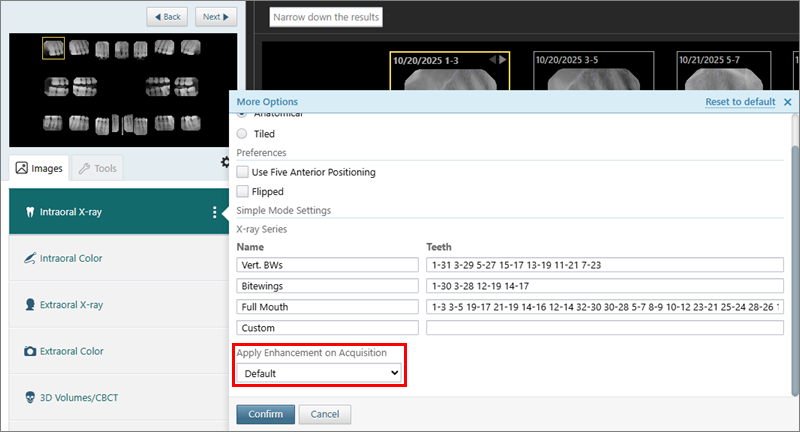
- Default enhancement for Simple Mode acquisitions – For acquiring intraoral X-rays using Simple Mode, you can now select a default enhancement to apply to images. While in the Modality view, open the More Options menu for the Intraoral X-ray modality, select an option from the Apply Enhancement on Acquisition list, and then click Confirm.
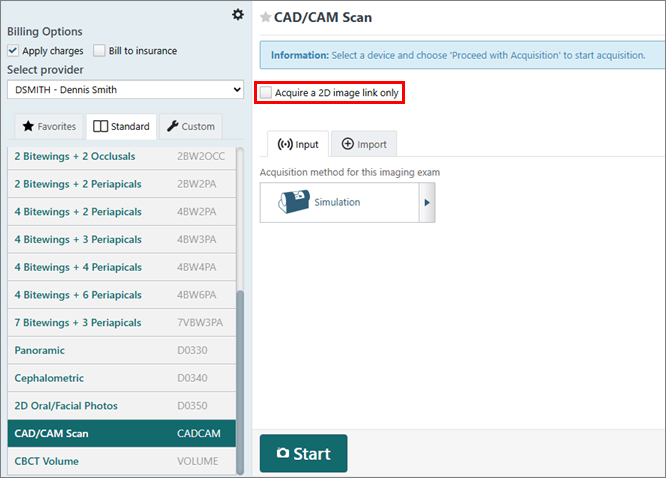
- CBCT acquisitions for full volumes by default – If Dentrix Ascend Imaging has never been used, for CBCT acquisitions, the Acquire a 2D image link only checkbox is clear by default (if applicable for selected acquisition device).
- Invalid tooth range error message – When you are acquiring intraoral X-rays using Simple Mode, an error message now appears if you add a tooth range that is not valid.
Fixes
This release resolves the following issues:
- An error occurs when you attempt to share a 3D volume exam to Anatomage/Invivo if Invivo’s application installation path was not set to the expected registry location. Now, Dentrix Ascend Imaging looks at both possible registry locations when it checks for the Invivo installation path. (AI-4689)
- An error occurs if you open the Rearrange Exam dialog box while having an empty exam slot selected. (AI-4726)
- An error occurs when an exam is reassigned, but not all the images are assigned to the new patient. (AI-4807)
- When you attempt to acquire a 2D photo, Carestream is selected by default as the acquisition device, which results in an acquisition error. (AI-4816)
- When you acquire a panoramic image using the Planmeca TWAIN source, you must manually calibrate each image. (AI-5020)
- If the acquisition agent is not running, you cannot download a 3D volume. (AI-5064)
- You cannot sync images that were acquired in offline mode. (AI-5075)
- Console errors occur when you are recovering CAD/CAM exams. (AI-5073)
- You cannot reassign new patients when using external IDs. (AI-5076)
- For a photo exam with multiple images, you cannot interact with all images in that exam if Videa AI is enabled. (AI-5081)
- Default settings are incorrect for the Medit software bridge. (AI-5084)
- Simple Mode acquisitions of intraoral X-rays are not working. (AI-5095)
- An uncaught type error occurs when you attempt to import a 3D volume using the Import tab. (AI-5101)
- Multiple telemetry events are sent when you adjust the brightness and contrast of an extraoral X-ray image. (AI-5102)
- When you attempt to acquire a CAD/CAM scan using the DTX Studio Clinic Software Bridge, the 2D images are not transferred into Dentrix Ascend Imaging. (AI-4859)
- An error occurs when you attempt to reassign an exam with MockPMS and external IDs. (AI-5108)
- On the acquisition setup page, an invisible Cancel button can be clicked. (AI-5106)
- An error occurs when you attempt to recover CAD/CAM scans (as the images are loaded in the viewer). (AI-5086)
- For a 3D volume or CAD/CAM scan, the button to open the image in the third-party app does not work. (AI-5115)