
EARLY ACCESS ONLY
Since the release of the “Posting Primary Max Allowable Fees” feature, an improvement has been made that allows you the choose to have Dentrix Ascend automatically update the amounts for all treatment-planned procedures to match the corresponding fees in the applicable contracted fee schedules (assuming the patients have in-network insurance plans with a Max allowable amount fee schedule selected).
Note: The updating of the amounts will occur overnight.
To have max allowable fees posted and have treatment plans updated automatically
1. Go to Settings > Ledger Options, and then select the Ledger Rules tab.
2. Under Insurance Estimates & Write-offs, do one of the following:
- If the Automatically post contracted write-offs when claims are created or Manually post contracted write-off during claim adjudication option is selected, select the No write-off. Post contracted fee, if applicable option.
- If the No write-off. Post contracted fee, if applicable option is selected, select the Automatically post contracted write-offs when claims are created or Manually post contracted write-off during claim adjudication option.

3. Click Save.
The new Contracted Fee Updates message appears. Notice that there is now a checkbox at the bottom.
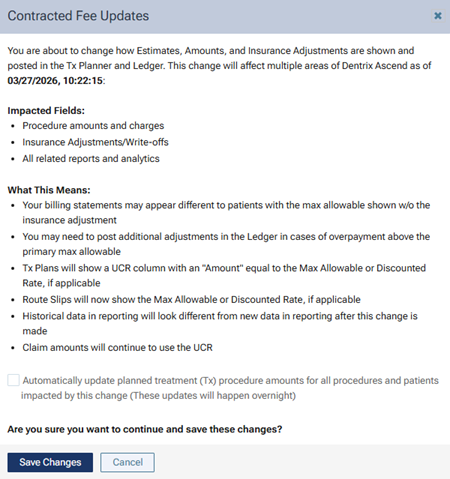
4. If you want the amounts for planned treatment to be updated automatically, select the Automatically update planned treatment… checkbox; otherwise, leave the checkbox clear.
5. Click Save Changes.
If you selected the No write-off. Post contracted fee, if applicable option and selected the Automatically update planned treatment… checkbox, the amounts in each treatment plan are updated automatically, as applicable, to the contracted rate.
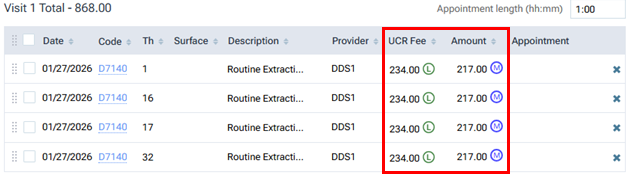
Notes:
If you selected the No write-off. Post contracted fee, if applicable option and did not select the Automatically update planned treatment… checkbox, the amounts in each treatment plan are not updated automatically to the contracted rate; you must update each procedure amount or visit total manually. (This is how the feature functioned previously—before the checkbox to allow the automatic updating of amounts was made available.)
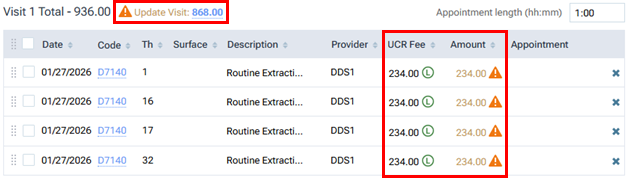
If you selected the Automatically post contracted write-offs when claims are created or Manually post contracted write-off during claim adjudication option (assuming the No write-off. Post contracted fee, if applicable option was selected previously), one of the following occurs according to the state of the Automatically update planned treatment… checkbox:
- If you selected the checkbox, the amounts in each treatment plan are updated automatically, as applicable, from the contracted rate to the UCR fee.
- If you did not select the checkbox, the amounts in each treatment plan are not updated automatically; you must update each procedure amount or visit total from the contracted rate to the UCR fee.