
Released 10/28/26
You can now have Dentrix Ascend verify coverage eligibility automatically for secondary insurance plans. This functionality can help eliminate manual lookups for secondary plans in payer portals, reduce coordination-of-benefits (COB) rework, and decrease secondary claim denials. The automatic eligibility verifications occur nightly. Also, from eligibility responses, you can import secondary insurance plan information.
Note: This functionality is available with Eligibility Essentials and Pro subscriptions.
Enabling automatic secondary verifications
From the eligibility manager, you can enable automatic secondary eligibility verifications per location.
1. Go to Home > Eligibility Manager, and then select Settings.
2. If you have access to multiple locations, under Where Do These Settings Apply? (on the right), select the checkbox of one or more locations to view the settings on the left.
3. Ensure that Run Eligibility Verification Automatically is set to Enabled.
4. Set Run secondary verification automatically to Enabled.
Note: The secondary setting is available only if the primary setting is enabled. Disabling the primary automatically disables the secondary.
5. Click SAVE.
How automated verification works
- Nightly – Verifications occur automatically each night for active primary and secondary plans attached to patients with upcoming appointments within your configured number of lead days (business days).
- When appointments are scheduled – A verification occurs automatically when an appointment is booked within your configured number of lead days.
- Primary and secondary checks are separate – Primary and secondary requests run independently. A pending or failed primary check does not block the secondary check.
Note: Tertiary and higher coverages are not checked automatically.
Viewing and importing secondary benefits
The Import Benefits section of the eligibility manager now displays pending benefit imports for secondary plans. Primary plans have a “P” indicator. Secondary plans have an “S” indicator.
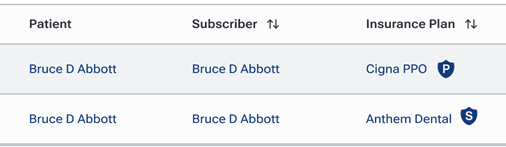
To review and then import primary or secondary insurance information as needed, click an item in the list.
Notes:
- Importing secondary insurance plan information occurs separately from primary insurance plans.
- From the Settings section of the eligibility manager, you can enable or disable automatic imports for locations.
- Importing is available only for locations with an Eligibility Pro subscription.
Eligibility manager metrics
The metrics in the Overview section of the eligibility manager now include data for secondary coverage:
- Payer Response % – Includes primary and secondary verification volume and response rates.
- Time Saved – Calculates time saved across all successful primary and secondary verifications (20 minutes for each successful Pro reply; 5 minutes for each successful Essentials reply).
- Schedule Readiness – The counts for Eligible, Unable to verify, Ineligible, and Uninsured include primary and secondary coverage verifications.
- Benefits Import Pending – The number of pending imports includes primary and secondary eligibility responses.
- Benefits Imported – The number of automatic imports includes primary and secondary eligibility responses.
Eligibility settings removed from location information
As part of this change, on a location’s Location Information page, the settings for automatic eligibility verifications and benefit imports have been removed. You can now manage those settings only from the eligibility manager.
