
Released 2/12/26
With an Eligibility Pro subscription, when a response is received for an eligibility request, insurance information can now be imported into Dentrix Ascend automatically. Previously, you could only import this information manually.
To allow automatic imports
For each location, open the Location Information page (Settings > Location Information), set the Auto-Import Insurance Eligibility switch to Yes, and then click Save.
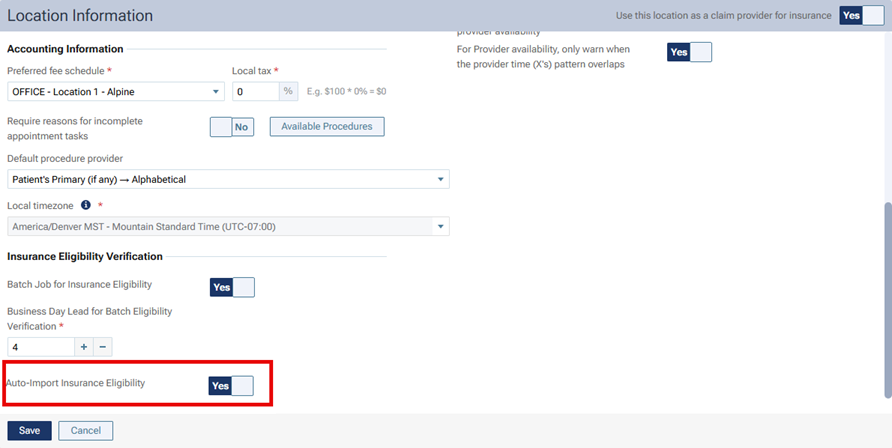
Note: The automatic import option is available only if an Eligibility Pro subscription is associated with the location.
The following types of information can be imported automatically:
- Deductibles and benefits
- Coverage percentages
- Coverage exceptions
- Other plan options
For insurance information to be imported automatically, the following criteria must be met:
- The payer must be supported.
Note: The payer must return a single network of benefits. Currently, only MetLife is supported. - The plan’s group number returned by the payer must match the plan’s group number in Dentrix Ascend.
Note: If the payer does not return a group number, if a group number does not exist in Dentrix Ascend, or if the group number in the response does not match the group number in Dentrix Ascend, the automatic import will not occur. - The plan must be “In Network.”
During the import, one of the following occurs for each value:
- If the value in the response is null or does not exist, the corresponding value in Dentrix Ascend is not updated.
- If the value in the response matches the corresponding value in Dentrix Ascend, the value in Dentrix Ascend is not updated.
- If the value in the response differs from the corresponding value in Dentrix Ascend, the value in Dentrix Ascend is updated.
Note: If the automatic import fails, the manual import workflow is available.