
Released 9/9/26
If a patient completes and submits a form that contains certain fields, the information from those fields can update the patient’s record. To help you know which form fields allow automatic write-back or synchronization, while you are adding or editing a form in the form builder (Settings > Form Builder), a “Sync” indicator now appears next to each applicable Patient Fields element on the left panel.
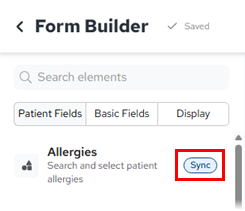
Currently, the following fields allow automatic write-back or synchronization:
- Allergies.
- Email Address.
- Medical Conditions.
- Medications.
- Mobile Phone.
- Patient Address.
- Patient Basic Information – Preferred Name, Email Address, Mobile Phone, and Address only.
- Preferred Name.
- Preferred Pharmacy.