
Released 6/3/26
When you are adding or editing a frequency exception for an insurance plan’s coverage table, there is now a checkbox, “Apply per treatment area.” Leaving the checkbox selected preserves the existing insurance calculation logic from before this release (the procedure code is covered X times in the specified period if the treatment area differs). Clearing the checkbox adds new insurance calculation logic (the procedure code is covered X times in the specified period without regard to the treatment area).
To add a frequency exception
1. On the Home menu, under Insurance, click (or tap) Carriers.
The Insurance Carriers page opens.
2. Select an insurance carrier.
The options for editing the insurance carrier become available.
3. Under Plans/Employers, select an insurance plan.
The options for editing the insurance plan become available.
4. Click (or tap) Coverage Table.
The Coverage Table dialog box appears.
5. Click (or tap) Manage Exceptions.
The Manage Exceptions dialog box appears.
6. Click (or tap) Add New Exception.
The options for adding the exception become available.
7. On the Exception Type tab, select Frequency to add procedures that are covered at certain intervals.
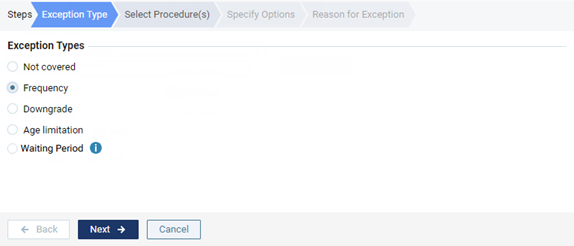
8. Click Next.
9. On the Select Procedure(s) tab, select the checkboxes that correspond to the procedure codes that are covered at certain intervals.
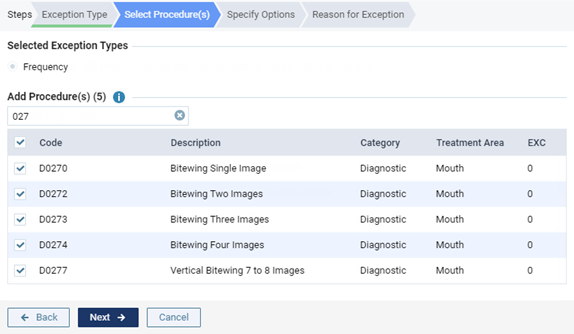
10. Click Next.
11. On the Specify Options tab, do the following:
- Specify how often the insurance carrier covers this procedure within a given time period. For How many times, either enter a number, or click (or tap) + or – to change the number. For Over the course of, enter a number, and then select Year(s), Month(s), or Day(s) from the list.
- Either leave the Apply per treatment area checkbox selected (preserves existing insurance calculation logic from prior to this release), or clear the checkbox (implement new insurance calculation logic).
- With the checkbox clear – When you treatment plan a selected procedure for this exception, Dentrix Ascend takes the specified frequency limitation and the procedure date and coverage start date into account when it calculates an insurance estimate. For example, if procedure A was performed one year ago, and there is a once-every-two-years frequency limitation allowed by insurance for procedure A, if you treatment plan procedure A today, Dentrix Ascend looks back two years from today (assuming the start date of the patient’s insurance plan coverage is at least that far back) and recognizes that the previous posting of procedure A was rendered less than two years ago, so today’s planning of procedure A is seen as not covered. In this case, the estimated insurance portion is calculated as $0.00.
- With the checkbox selected – When you treatment plan a selected procedure for this exception, if a treatment area (such as tooth, quadrant, or arch) applies to that procedure, Dentrix Ascend takes not only the specified frequency limitation and the procedure date and coverage start date into account (as explained for “With the checkbox clear”) but also the treatment area into account when it calculates an insurance estimate. For example, if procedure A for the UL quadrant was performed three months ago, and there is a yearly frequency limitation allowed by insurance for procedure A if it is performed on the same treatment area, if you treatment plan procedure A for the UR quadrant today, Dentrix Ascend recognizes that the previous posting of procedure A was rendered on a different treatment area from the treatment area for today’s planning of procedure A, so the correct estimated insurance portion is calculated instead of $0.00.
- With the checkbox clear – When you treatment plan a selected procedure for this exception, Dentrix Ascend takes the specified frequency limitation and the procedure date and coverage start date into account when it calculates an insurance estimate. For example, if procedure A was performed one year ago, and there is a once-every-two-years frequency limitation allowed by insurance for procedure A, if you treatment plan procedure A today, Dentrix Ascend looks back two years from today (assuming the start date of the patient’s insurance plan coverage is at least that far back) and recognizes that the previous posting of procedure A was rendered less than two years ago, so today’s planning of procedure A is seen as not covered. In this case, the estimated insurance portion is calculated as $0.00.
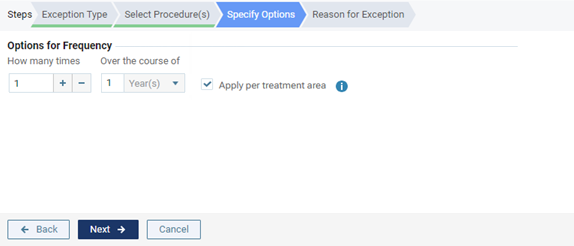
12. Click Next.
13. On the Reason for Exception tab, enter the reason for the exception in coverage for this procedure.
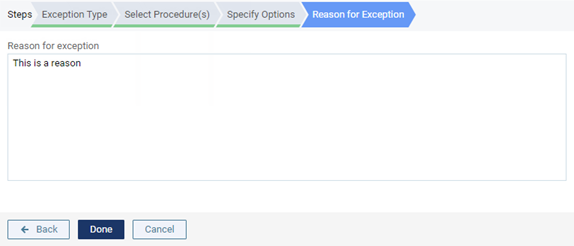
14. Click Done.