Released 2/11/26
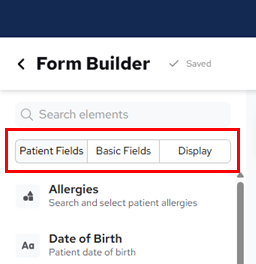
When you are creating or editing a patient form using the form builder, you will now notice that the names of the element categories have been changed, but there has not been any change to the underlying functionality and data synchronization capabilities.
To see the new categories
1. Go to Settings > Form Builder.
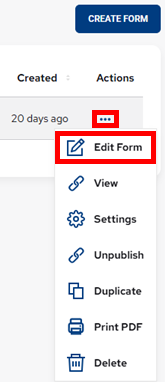
2. In the Actions column, click (or tap) the ellipsis of the form that you want to edit to view a menu, and then select Edit Form.
The Form Builder page opens.
On the panel of elements (on the left), the following changes have been implemented:
- The “Sync” tab has been renamed to “Patient Fields.”
- The “Fields” tab has been renamed to “Basic Fields.”
- The “Static” and “Layout” tabs have been combined one tab named “Display.”