
EARLY ACCESS ONLY
On a patient’s graphical tooth chart (odontogram), you can now draw annotations using pre-defined shapes: rectangles, ellipses, triangles, straight lines, and arrows.
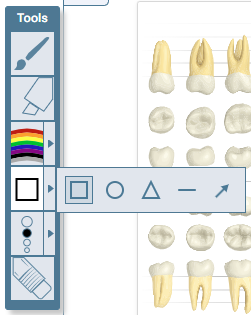
Notes:
- The color and thickness options affect a shape’s line/border.
- The square, circle, and triangle do not have fill color.
- With the eraser, you can click any part of the shape to remove it.
- Double-clicking a shape’s line/border to select it, and then do any of the following:
- Drag the selected shape to another location on the drawing area – Drag the shape in any direction (the pointer changes to a four-way arrow when positioned over the shape, except over a resizing handle).

- Resize the selected shape – Drag a resizing handle in the applicable direction (the pointer changes to a two-way arrow when positioned over any of the resizing handles of the line/border).

- Rotate the selected shape – Drag the rotating handle clockwise or counterclockwise (the pointer changes to a hand when positioned over the rotating handle).

- Change the color of the selected shape.
- Change the thickness of the line/border of the selected shape
- Drag the selected shape to another location on the drawing area – Drag the shape in any direction (the pointer changes to a four-way arrow when positioned over the shape, except over a resizing handle).