
Released 11/5/25
Including Medications on Patient Forms
You can now flag the medications that you want to have appear on any form that includes the “Medications” element. Only the medications you have flagged in Dentrix Ascend will be available for a patient to select on forms.
To edit a medication
1. On the Settings menu, select Medical Alerts & Medications.
The Medical Alerts & Medications Library page opens.
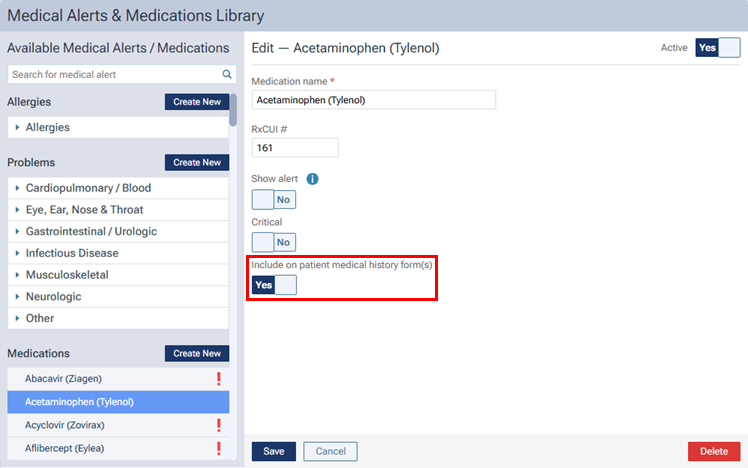
2. Select a medication.
3. Set the Include on patient medical history form(s) switch to Yes.
4. Click Save.
Medications Selected Automatically on Patient Forms
If a patient form has a “Medications” element, active medications that are associated with a patient’s record are now selected automatically on the form.
Syncing Responses for Medications on Patient Forms
Now, a patient’s record can be updated automatically by responses to a question about medications on a form. If a patient selects a medication to add it on the form (a “positive” response, such as indicating that he or she is taking Allegra), the patient’s record will be updated. If a patient removes a selected medication on the form (a “negative” response, such as indicating that he or she no longer takes Advair), the patient’s record will be updated. Any of the following may occur when a response to a medication question on the form is synchronized with a patient’s record:
- If a medication does not exist for the patient, and that medication on the form has a positive response (the medication is active), it is added to the patient’s list of medications. An expired medication is considered not to be an existing medication in the patient’s record.
Notes:- For a medication that has been added to the patient’s record, a note is included and contains the text “Indicated by patient via forms” and the date. Also, the default status of the Show alert and Critical switches for the medication assigned to the patient are based on the status of those switches for that medication in the medications library.
- When the patient indicates on a patient form that he or she now takes a medication, an entry, which states that the addition of the medication for the patient was indicated by the patient via a patient form, is added to the audit log.
- For a medication that has been added to the patient’s record, a note is included and contains the text “Indicated by patient via forms” and the date. Also, the default status of the Show alert and Critical switches for the medication assigned to the patient are based on the status of those switches for that medication in the medications library.
- If a medication does exist for the patient, it is not expired, and that medication on the form has a positive response (indicating that the medication is active), it remains in the patient’s list of medications.
- If a medication does exist for the patient, it is not expired, and that medication on the form has a negative response (indicating that the medication is not active), it remains in the patient’s list of medications but is marked as “Expired.”
Notes:- For a medication that has been expired in the patient’s record, the text “Expired by patient via forms” and the date are appended to any existing note text.
- When the patient indicates on a patient form that he or she no longer takes a medication, an entry, which states that the medication for the patient was expired by the patient via a patient form, is added to the audit log.
- For a medication that has been expired in the patient’s record, the text “Expired by patient via forms” and the date are appended to any existing note text.