
EARLY ACCESS ONLY
Important Note: An updated acquisition agent may be required for features in this release. For instructions on checking for updates, refer to the “Updating the acquisition agent” Help topic.
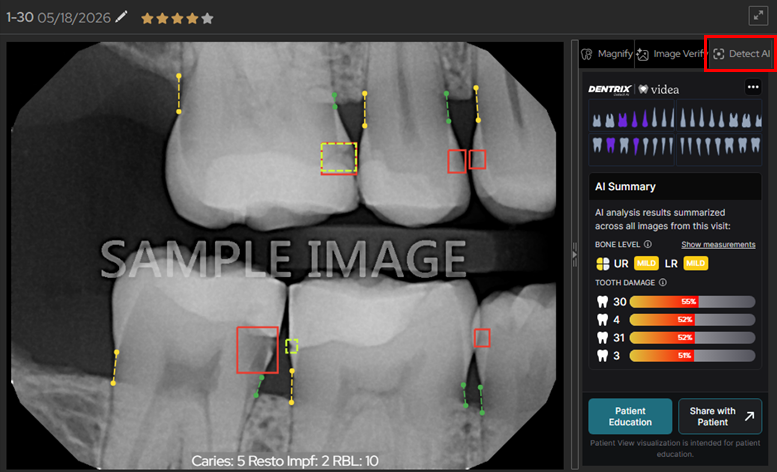
Detect AI Tab Is Selected by Default
If Detect AI is enabled for the location that you are logged in to, on the AI panel (the panel on the right), the Detect AI tab is now selected by default for each patient (when you start a new image-viewing session for that patient). Previously, the Magnify tab was selected by default.
Fixes
This release resolves the following issues:
- After checking and/or unchecking an option in the “Narrow down the results” menu, the Tools tab is grayed out and cannot be clicked until another image is selected. (IMG-1104)
- If you are acquiring images using the ‘DEXIS/Kavo Sensors’ device option and the sensor disconnects from the PC, disconnection is not detected, and it stays green. (IMG-1138)
- If a dialog box has a scrollbar, the whole dialog box scrolls instead of the header and footer always being visible and the middle section being the part that scrolls. (IMG-1153)
- When you close the AIDE view, findings that had been hidden are no longer hidden. (IMG-1162)
- In the Ortho Report composer, parts of the image tools (flip, delete, etc.) are cut off at minimum resolution. (IMG-1163)
- In the Exam View, rearranging an exam sometimes causes an uncaught TypeError. (IMG-1164)
- In the Modality View’s “More Options” dialog box, the cursor turns into a pointer in random areas with nothing to click on. (IMG-1165)
- In the Exam View, you can toggle checkboxes by clicking a distance away from the checkbox and text. (IMG-1168)
- Images displayed on the Magnify tab have extra black space along the bottom, and occasionally the sides. (IMG-1178)
- Sometimes errors appear because a job is trying to scan files that were deleted. (IMG-1196)
- For claim attachments, if you click a dropdown list, a box appears around the corresponding text (label). (IMG-1198)
- The dropdown list for changing the default enhancement for Simple Mode acquisitions is missing. (IMG-1199)
- For an Ortho Report, you can enter the date only in the US format (MM/DD/YYYY). (IMG-1201)
- Incorrect cross-tenant handling in legacy RealCloud. (IMG-1203)
- DICOM extraction fails on images with an “Unknown laterality” error when a DICOM file contains an Anatomic Region Sequence and Image Laterality is empty. (IMG-1207)