
Released 3/4/26
Important Note: An updated acquisition agent may be required. For instructions on checking for updates, refer to the “Updating the acquisition agent” Help topic.
CAD/CAM Software Bridge for Shining 3D
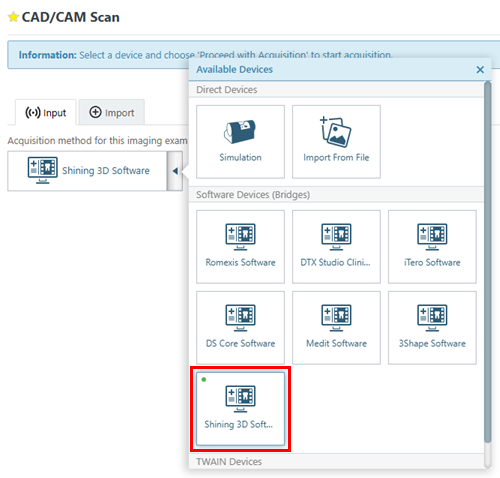
You can now acquire CAD/CAM images with a software bridge for Shining 3D, and you can view those acquired images in Dentrix Ascend Imaging.
Fixes
This release resolves the following issues:
- In the Modality view, while viewing the Overview section, positioning your pointer over Intraoral X-ray and scroll with your mouse wheel causes an Uncaught Type Error. (AI-4359)
- After you acquire a snapshot of a 3D exam and return to the exam list, the Tools tab is not available. (AI-4660)
- In Offline Mode, during a Simple Mode acquisition, the program attempts to retrieve AI credentials but should not. (AI-5077)
- For an exam with multiple photos, with any image selected, in the dialog box that appears when you are reassigning, renaming, or deleting the exam, the image in the exam currently selected has a highlighted border. (AI-5264)
- In the Modality View, when you are using AIDE, the Tools tab is still available but should not be. (AI-5268)
- Attempting to assign tooth numbers in a custom template can cause an Uncaught Type Error. (AI-5269)
- In the Modality View, the scroll bar disappears when you switch from the Overview to a modality with no images. (AI-5282)
- .NET ServerPrefix is not forwarding images. (AI-5319)
- To start the import of a single bitewing exam, you are not required to assign teeth but should be. (AI-5329)
- An invisible box partially blocks the options on the acquisition device menu. (AI-5330)
- If you select the option to acquire a periapical exam, select applicable teeth, and then switch to the option to acquire a single bitewing exam, the teeth for the periapical exam are still selected, and you cannot deselect them. Only teeth that are applicable for a bitewing exam should be allowed to be selected and assigned to a bitewing exam. (AI-5334)
- The scanned images count is incorrect after you mount images. (AI-5336)
- In the Modality View, if you cancel the More Options menu while there are errors in the series, the series is reverted to its state before the changes were made (as expected), but the error messages remain. (AI-5339)
- With Detect AI, “Undefined” appears at the bottom of an analyzed image instead of the number of the specific results. (AI-5349)