
Released 1/20/26
Important Note: Some of the new features and enhancements may require an updated acquisition agent. For instructions on checking for updates, refer to the “Updating the acquisition agent” Help topic.
Enhancements
This release provides the following enhancements.
Updated Retake Button
The Retake button has been moved and enhanced.
Before
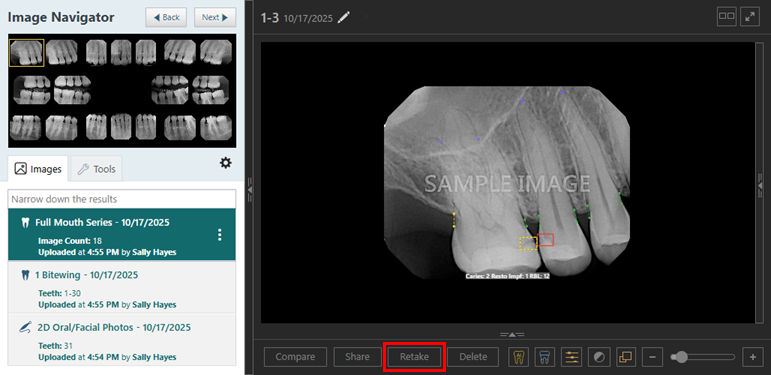
Now

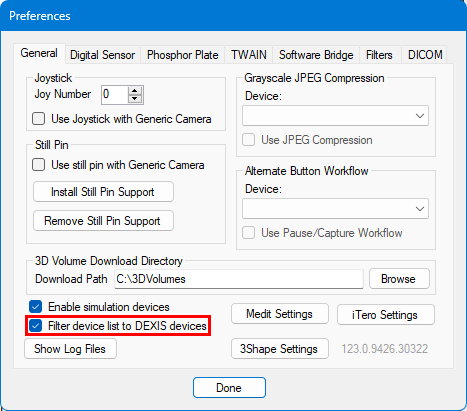
Modified Dexis Device Filter
The functionality of the Filter device list to DEXIS devices option in the acquisition agent preferences has been modified:
- Previously, with this checkbox selected, only Dexis devices were available for selection.
- Now, with this checkbox selected, all devices are available for selection, but Dexis devices are at the top of the list.
Miscellaneous
- Error messages for AI submissions have been reworded so they are easier to understand.
- In the About dialog box for Dentrix Ascend Imaging, the manufacturer’s name and address have been changed to Henry Schein One, LLC, 2501 N Loop Dr Suite 1700.
Fixes
This release resolves the following issues:
- When comparing, the checkbox under All Types is not bold when you are narrowing the results. (AI-4382)
- In the single image view, the image changes after you press the arrow key, causing performance issues. (AI-4993)
- With a Simple Mode acquisition, error indicator bars are rendered inconsistently as the window size changes. (AI-5070)
- In the Exam View, the Rearrange Exam button icon has a dot. (AI-5071)
- During the acquisition of a 2D color photo, the header appears twice and is misaligned. (AI-5072)
- During a CAD/CAM recovery, an occupied slot appears empty if another scan is mounted and then unmounted. (AI-5087)
- During the acquisition of a 3D Volume, selecting Both Jaws does not select both jaws. (AI-5100)
- During a CAD/CAM recovery, template slots are not displayed. (AI-5122)
- Retaking a rearranged exam causes an uncaught type error. (AI-5131)
- Starting image recovery after rearranging an exam throws an uncaught type error. (AI-5134)
- For an exported image, the image is cut off to display the tooth number and date. (AI-5135)
- During a Simple Mode acquisition, an empty series can be selected but should not be. (AI-5137)
- When you are rearranging an exam, holding the Enter key repeatedly applies rotate/flip. (AI-5155)
- In the Modality View, for a stack with multiple image stack, the flag appears inconsistently in different corners. (AI-5161)
- With a Simple Mode acquisition, a series is restricted by bounding rules, causing deselection. (AI-5173)
- With the Carestream Software Bridge, an acquisition freezes before Carestream opens. (AI-5180)
- The flyout panel is not cleared when you select an empty image template. (AI-5186)
- The AI side panel does not correctly at the minimum resolution. (AI-5188)
- In a gallery of thumbnails, dates shift to the next line for medium/large thumbnails. (AI-5196)
- Exiting full screen mode by pressing the Esc key causes arrows to appear in the exam list, but navigation arrows should appear only when the exam list is collapsed. (AI-5197)