
Released 1/15/26
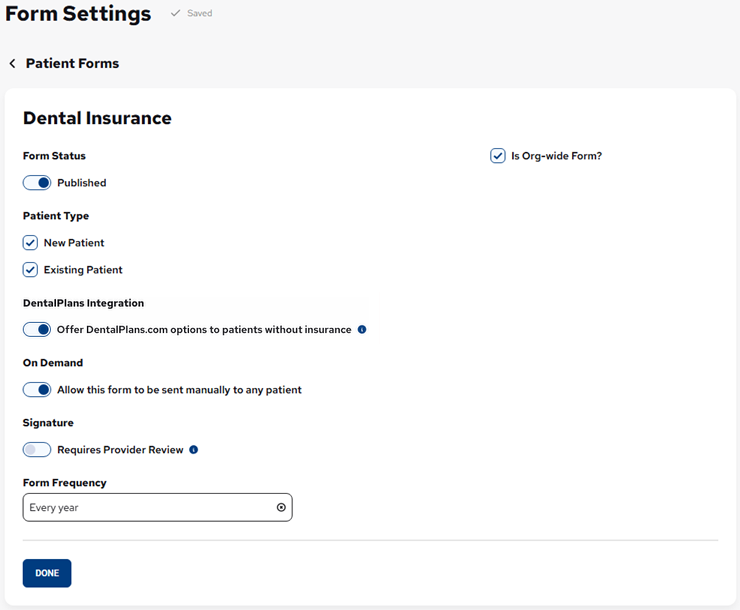
The Form Settings dialog box for patient forms has been redesigned to better help you understand how patient forms are delivered so you can avoid configuration errors.
Note: With this release, all existing configurations are fully preserved. How forms are delivered remains unchanged. Only the layout of the dialog box has changed.
Before
Now
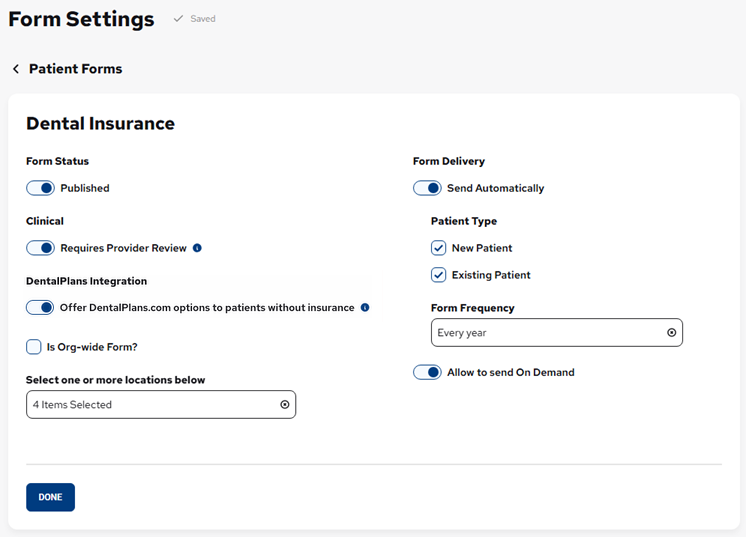
Layout changes:
- Form Status – As in previous versions, there is a Published switch.
- Patient Type – These checkboxes have been moved to the new Form Delivery section. The checkboxes appear only if the new Send Automatically switch is on.
- On Demand – The section header has been removed, and the corresponding switch has been renamed and moved to the new Form Delivery section.
- Clinical – The section has been renamed from “Signature.” As in previous versions, there is a Requires Provider Review switch.
- DentalPlans Integration (Early access only for this feature).
- Is Org-wide Form? – As in previous versions, selecting this checkbox selects all locations, and the Select one of more locations below list is not available; and clearing this checkbox causes the Select one of more locations below list to be available so you can select the applicable locations.
- Form Delivery – New section with two options:
- Send Automatically – Determines whether a form is sent automatically or not. With this switch on, the patient type and form frequency options are available so you can specify which patients are eligible to receive the form and how often; with this switch off, the patient type and form frequency options are not available because they are not relevant. With this switch on, at least one Patient Type must be selected to save the form’s settings.
- Allow to Send On Demand – Determines if the form can be sent on demand. The switch was renamed from “Allow this form to be send manually to any patient” and moved here.
Notes:
- To preserve backward compatibility:
- For an existing form with a Patient Type selected, the Send Automatically switch is on.
- For an existing form without a Patient Type selected, the Send Automatically switch is on but disabled. To save the form’s settings, at least one Patient Type must be selected, or the Send Automatically switch must be turned off.
- For an existing form with a Patient Type selected, the Send Automatically switch is on.
- Turning the Send Automatically switch off does not erase previously saved Patient Type and Form Frequency values.