
Released 10/14/26
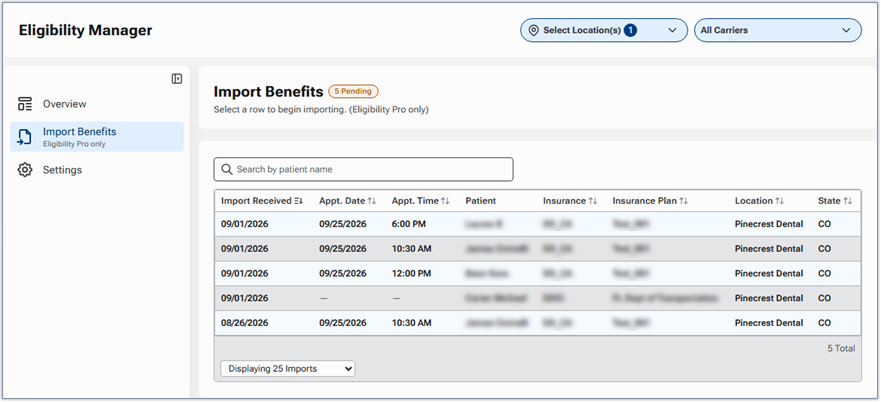
The Import Benefits section of the eligibility manager displays pending benefit imports, which enables front-office and central billing office (CBO) teams to centrally view, search, review, and import electronic insurance eligibility benefit data directly into patient records across multiple practice locations. Instead of checking individual patient charts or hunting for notification icons across separate locations, you can manage all pending insurance benefit responses from a single centralized queue.
Accessing the view
To access the Import Benefits section of the eligibility manager, go to Home > Eligibility Manager to open the eligibility manager with the Overview section displayed, and then select Import Benefits on the navigation panel (on the left).
Understanding the view
- Pending count – The “Pending” badge displays the total number of eligibility responses that have been received but not yet applied to a patient’s record.
- Multiple locations – The list includes pending benefit imports across all practice locations with an active Eligibility Pro subscription.
- 30 days – The list includes unimported eligibility responses received within the past 30 calendar days.
- Details – For each entry the following details appear: date import was received, appointment date, appointment time, patient, insurance carrier, insurance plan, location, and state.
Filtering by location
Use the Select Location(s) list to filter the list by location. If you have not changed the location filter since you logged in to Dentrix Ascend, the location that you are currently logged in to is selected.
Note: A change in the location filter is saved until you log out of Dentrix Ascend.
Searching for a patient
Type in the Search by patient name box to quickly find an individual patient’s appointment in the list (according to the location filter that is currently applied). You can search by name.
Note: You must enter at least two characters for the system to start filtering the list.
Sorting the list
By default, the list is sorted by the Import Received column. You can click a column header (except for “Patient”) to sort the list by that criteria.
Importing information
To review and then import insurance information as needed, click an item in the list.
Note: Importing is available only for locations with an Eligibility Pro subscription.