Released 12/17/25
You can now choose whether insurance calculations use the billing or rendering provider’s status, ensuring accurate write-offs and contracted rates for every procedure. This update eliminates the incorrect adjustments that occur when rendering providers have different carrier contracts from the location, reducing manual correction and improving billing accuracy for multi-provider practices.
You can now choose to calculate and post write-offs (or post contracted rates, if applicable) based on the billing provider or the rendering provider (provider of procedures) if that provider is contracted with the carrier. Previously, contracted write-offs could be calculated based on the billing provider only.
To change the setting, go to Settings > Insurance Defaults.
Notes:
- Insurance claim defaults are location specific (each location of your organization has its own insurance claim defaults).
- Setting up insurance defaults requires the “Edit Insurance Defaults” security right.
On the Insurance Defaults page, there is now a PPO Write-offs or Contracted Amounts section. In this section, there are options for Billing Provider and Rendering Provider. Also, there is a Warn when scheduling an appointment if the Billing or Rendering Provider is not contracted with the patient’s primary insurance plan switch (which was moved from the Billing Provider section to this section and reworded).
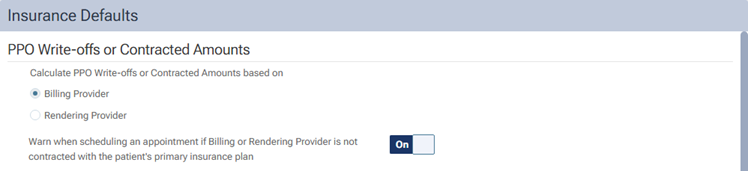
The Billing Provider and Rendering Provider options control the following:
- If the billing or rendering provider is contracted with the carrier, Dentrix Ascend estimates and posts the write-off (or posts the contracted amount if the ledger option to post the contracted rate instead of the UCR fee is on; currently, this setting is not available for every organization).
- If the billing or rendering provider is not contracted with the carrier, Dentrix Ascend posts the provider’s fee or, if a fee schedule is not assigned to the provider, the location’s fee.
Notes:
- The Billing Provider option is selected by default (thus preserving existing functionality). To continue basing write-offs (or contracted rates) on the billing provider, leave the Billing Provider option selected. However, if you want to switch to basing write-offs (or contracted rates) on the rendering provider, select the Rendering Provider option.
- If the Rendering Provider option is selected, and the Provider of Procedures option is selected, the contracted write-offs will be based on the “Contracted with” section for providers who provide treatment.
The functionality of the Warn when scheduling an appointment if the Billing or Rendering Provider is not contracted with the patient’s primary insurance plan switch is the same as before except it shows warnings according to the contracted status of the billing or rendering provider (depending on if the Billing Provider or Rendering Provider option is selected) instead of being able to show warnings according to the contracted status of only the billing provider.
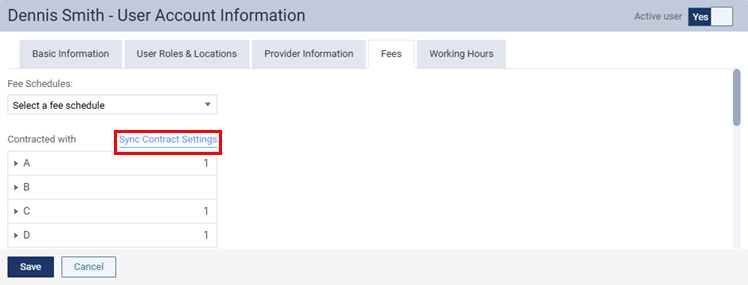
To make it easier to implement the new rendering provider solution, there is a Sync Contract Settings option for providers’ user accounts, which adds the contracted carriers from the current location (if the location is set up as a billing entity) to the provider’s contracted carriers.