
EARLY ACCESS ONLY
The Aged Receivables Report can now be grouped by provider.
To run the report, grouping it by provider
1. Go to Home > Aged Receivables.
The Aged Receivables page opens. On the left panel, there is now a Group By option. By default, Guarantor is selected, so the existing behavior and look of the report is preserved.
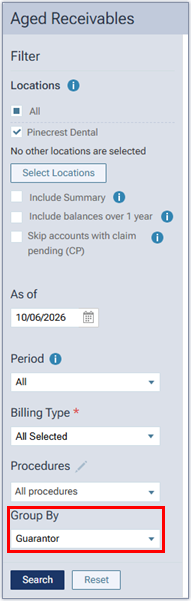
2. From the Group By list, select Provider.

3. Set up the other filters as needed.
4. Click Search.
The generated report appears on the right.
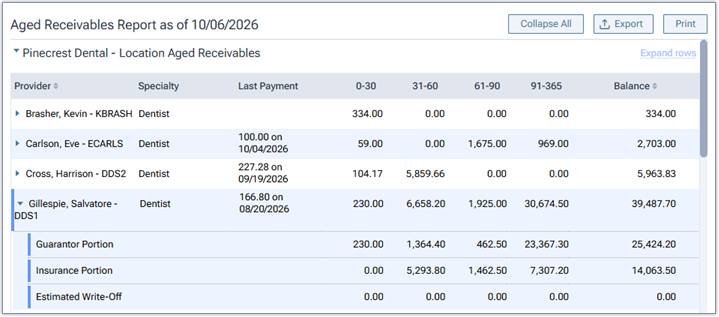
Grouped by provider, this report provides the following information:
- Charges are grouped by provider (instead of guarantor). Payments are attributed through their allocations to those charges.
- Unapplied credits are calculated so location totals stay complete, but the “Unapplied Credits” column is hidden for the providers.
- If you expand a provider’s row, the guarantor portion, insurance portion, and estimated write-off appear; however, the “Unapplied Credits” column is hidden.
- The location totals section contains the same details as when you group the report by guarantor.