
Released 2/4/26
Important Note: Some of the new features and enhancements may require an updated acquisition agent. For instructions on checking for updates, refer to the “Updating the acquisition agent” Help topic.
Enhancements
This release provides the following enhancements.
Higher Contrast Buttons
As a user, I want the view buttons in the footer to be more visible. Currently, they appear as dark grey buttons on a dark grey background, which makes them hard to distinguish. The buttons should instead have a white background with black text for better visibility. This change would apply to all footer buttons across Exam and Modality views for each exam and modality type.

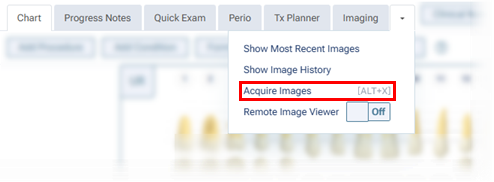
Keyboard Shortcut to Start Image Acquisition
The new keyboard shortcut Alt+X allows you to skip over the two clicks that it takes to start the image acquisition process. This shortcut is available only if you are viewing a patient’s clinical record (on the Chart, Progress Notes, Quick Exam, Perio, Tx Planner, or Imaging tab).
Fixes
This release resolves the following issues:
- While you are using the Modality View, in the Tiled view, the Flipped checkbox is available but should not be. (AI-3918)
- When you attempt to recover images, depending on the screen resolution, not all lists are accessible. (AI-4515)
- When you are renaming/reassigning an exam, you can select images in the dialog box, changing what is loaded behind it. (AI-4528)
- When you are viewing an image stack, if an arrow button is not active, pressing the corresponding arrow key can cause an uncaught type error. (AI-4530)
- When you setting up acquisition options for a 1 Bitewing Procedure, you can select non-bitewing teeth. (AI-4829)
- While you are using the Exam View, after you select an empty image slot and then an image, Back and Next are not available. (AI-4943)
- Rapid clicking images on filmstrip can trigger an uncaught type error. (AI-4972)
- While you are using the Modality View, with AIDE selected, the Tools tab is available but should not be. (AI-4974)
- While you are viewing the Overview, pressing an arrow key unexpectedly returns you to the Modality View. (AI-4983)
- While you are viewing the Overview, when switching from the Modality View, image stacks sometimes disappear. (AI-4994)
- If an empty slot is selected when you attempt to reassign an uncaught error appear. (AI-5027)
- While you are using the Exam View, after you click an empty placeholder, Back and Next become unavailable until the exam reloads. (AI-5082)
- While you are using the Exam View, clicking the Share button does not trigger telemetry. (AI-5138)
- Aconsole error appears when Videa fails to upload. (AI-5213)
- For a custom Intraoral Color Procedure, imported images are assigned to the wrong category (Digital Camera instead of Intraoral Camera). (AI-5218)
- The API returns exam data even with an incorrect Patient ID. (AI-5219)
- With Dentia, an unknown typology prevents the painting of all findings. (AI-5228)
- The checkboxes for selecting bitewing teeth are not centered at minimum resolution. (AI-5235)
- While you are viewing extraoral X-rays, the Detect AI tab appears. (AI-5239)