
EARLY ACCESS ONLY
Insurance payment adjustments impact more than the ledger; they impact provider compensation and production. To allow more accuracy and control with adjustments when you are entering an insurance payment, you can now split adjustments by procedure for both offsetting and write-off adjustments.
Previously, you could specify an adjustment amount per procedure, but you could select only one type of insurance adjustment (“Write-off” or “Offsetting”) and one adjustment type (such as “Insurance Adjustment”).
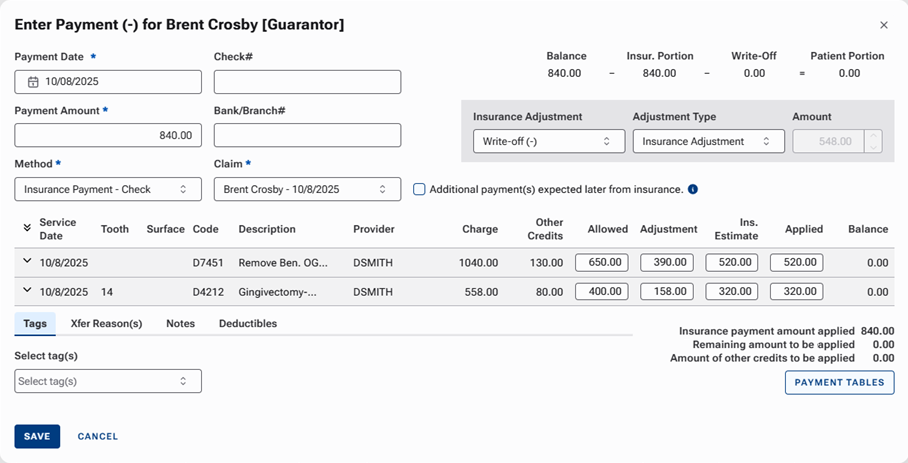
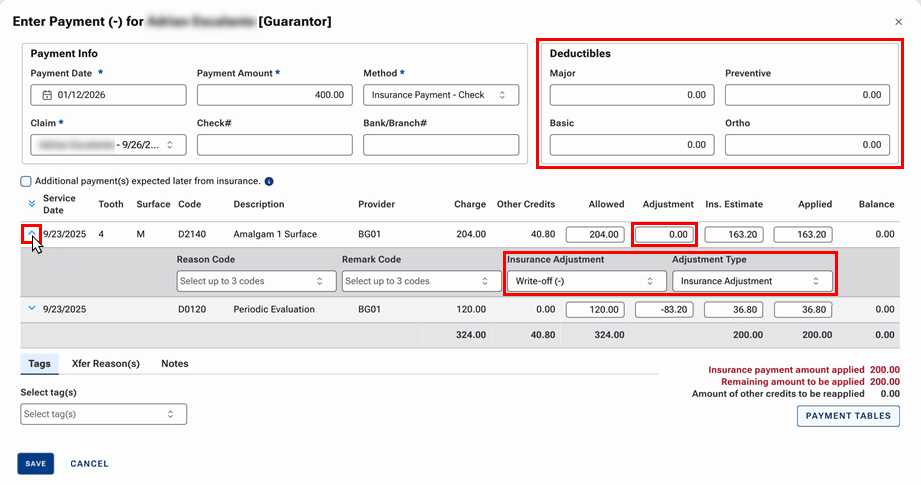
The dialog box has been changed in the following ways:
- The adjustment options are now available for each line item. When you expand a procedure, you select the Insurance Adjustment and Adjustment Type. You enter the amount of the Adjustment the same way you did in previous versions.
- The boxes for Deductibles have been moved from the tabs at the bottom to their own section in the upper-right corner, where they are always visible.
- The amounts for Balance, Insur. Portion, Write-Off, and Patient Portion in the upper-right corner have been removed.
Notes:
- You no longer need to post credit and charge adjustments after an insurance payment is posted because that will be handled with line item adjustments.
- Keyboard shortcuts have been implemented to help you enter insurance payment data more efficiently:
- Cmd+L (MacOS) or Ctrl+L (Windows) – Expand/collapse rows in the procedure table.
- Tab and Shift+Tab – Move forward/backward in the procedure table.
- Enter and Shift+Enter – Move down/up in the procedure table.
- Plus (+) – Make the adjustment an offsetting adjustment without expanding a row in the procedure table.
- Minus (-) – Make the adjustment a write-off without expanding a row in the procedure table.