
Released 1/7/26
If your location has an Eligibility Pro subscription, and certain plan options (source of payment, missing tooth clause, and/or crown/bridges paid on date) and/or the coordination of benefits methods have been updated due to a manual import, you can revert the updated plan options from the import back to their previous values within 30 days.
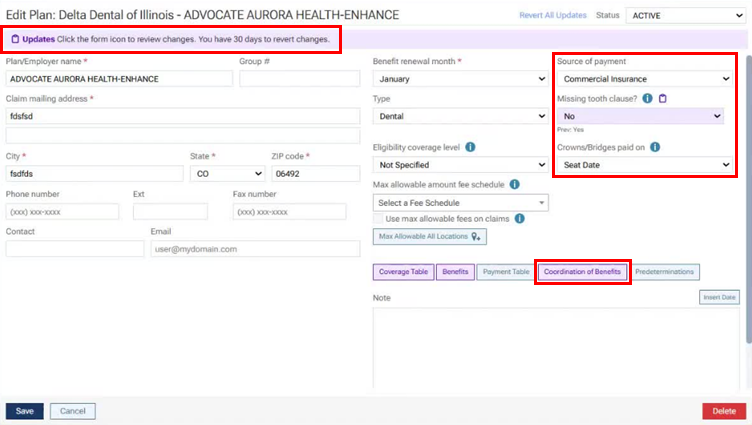
When you are viewing a carrier’s insurance plan in Dentrix Ascend (go to Home > Carriers, and then select a plan), if plan options and/or the coordination of benefits methods have been updated due to an import within the past 30 days, you will see a purple Updates notification, which explains that you have 30 days to revert any updates.
To accept/reject changes to the coordination of benefits methods
If the coordination of benefits methods have been updated due to an import within the past 30 days, the Coordination of Benefits button is purple. Click Coordination of Benefits. The Coordination of Benefits for [Plan Name] dialog box appears.
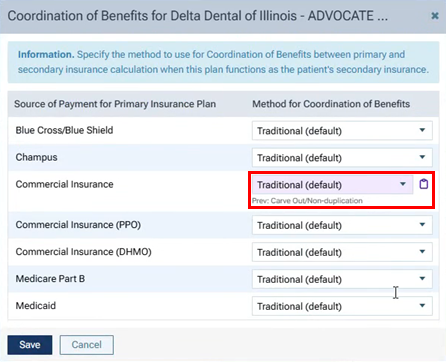
In the dialog box, you will notice that the list box for each value that has been updated is purple and has a clipboard icon. Below that list box, the previous value appears.
To revert an individual value, click the corresponding clipboard icon. In the pop-up box, the updated and previous values appear. Click the Revert link. Repeat this for any other updated value that you want to revert. Then, click Save.
To accept/reject changes to the plan options
On the Edit Plan page, if any of the following options have been updated, those options are purple and have an Update icon
 :
:
- Source of payment.
- Missing tooth clause?.
- Crown/bridges paid on.
To revert an individual value, click the corresponding Update (clipboard) icon. In the pop-up box, the updated and previous values appear. Click the Revert link. Repeat this for any other updated value that you want to revert.
Then, click Save to save the reverted values and accept all the updated values that were not reverted.
Important: Clicking Save accepts not only the changes to the plan options (source of payment, missing tooth clause, and crown/bridges paid on date) and the coordination of benefits methods but also any updates to the required deductibles, maximum benefits, coverage percentages, and/or coverage exceptions. Make sure you review those updates and revert any values as needed before you click Save. Once you click Save, the purple notification, purple highlights, and revert options disappear.